Conditional Access:
design for context.
A field guide to policy evaluation, authentication strength, device trust, session controls, emergency access and evidence-driven troubleshooting.
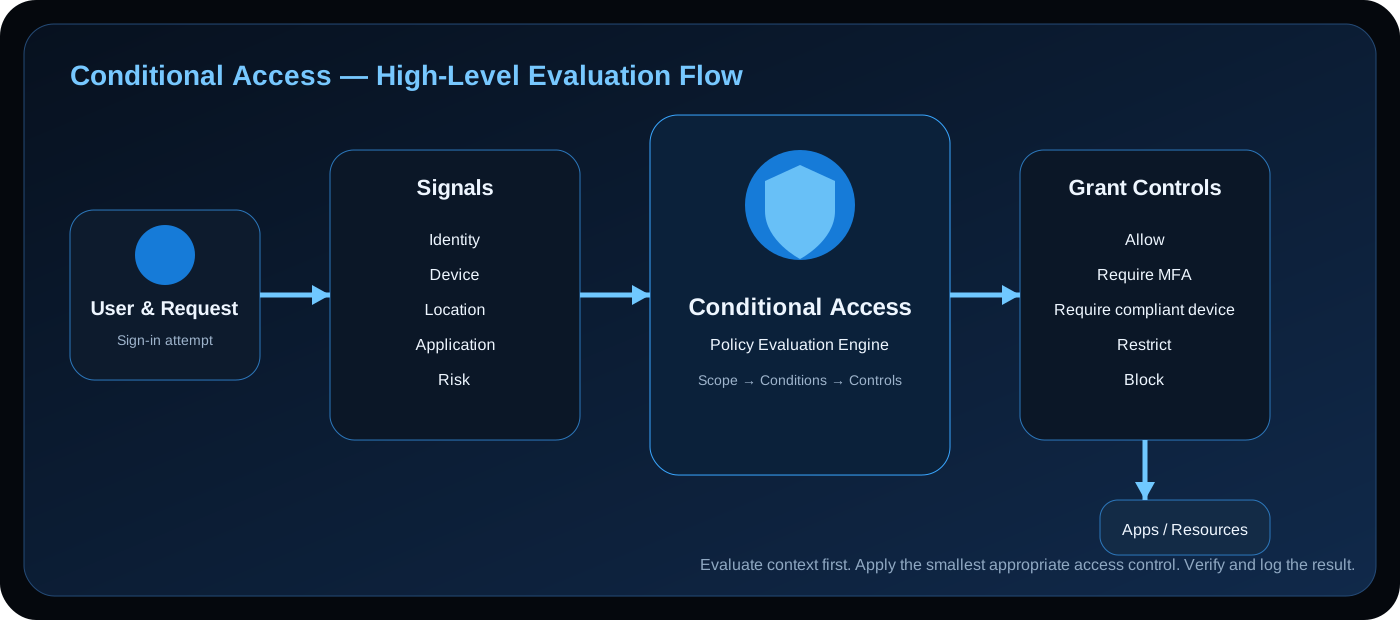
Conditional Access is a context-aware decision layer: request → signals → policy scope → conditions → controls → outcome.
1. The Policy Evaluation Model
Conditional Access evaluates sign-in context against policy scope and conditions. Matching policies can introduce grant or session requirements, while multiple policies can contribute to the final outcome.
Sign-in request → Identity + device + location + application + risk → Scope → Conditions → Controls → Access outcome2. Understand the Signals
Identity
User, group, role and authentication context.
Device
Platform, management and compliance state.
Location
Named locations and network context.
Application
Target cloud applications and workloads.
Risk
User and sign-in risk where supported.
3. Scope Before Conditions
First establish whether the policy targets the request. Check users/groups, application scope, conditions, exclusions and policy mode before changing MFA or device controls.
4. Authentication Strength
Distinguish between “MFA happened” and “the required authentication method was strong enough.” Use authentication strength appropriate to the resource risk and rollout plan.
5. Device Trust + Intune
Conditional Access can use Intune compliance as part of access decisions. Do not confuse enrollment with compliance: an enrolled device can still fail a compliance requirement.
Intune management → Compliance evaluation → Conditional Access → Resource access6. Grant Controls
Grant controls define what must be satisfied before access continues, such as stronger authentication, compliant-device requirements or blocking.
7. Session Controls
Session controls influence behavior after authentication. If users can sign in but are repeatedly prompted or restricted, investigate session behavior separately from initial authentication.
8. Protect Emergency Access
Maintain a documented break-glass strategy, appropriate protection and monitoring, and regularly verify the recovery path.
9. Safe Policy Rollout
Use a controlled progression: design → report-only where appropriate → pilot → enforce. Expand only after evidence supports the production change.
10. Troubleshooting a Block
Start with the sign-in event. Record user, application, timestamp, device and result. Identify evaluated policies, matched conditions and required controls.
11. Practical Policy Patterns
Admin access
Stronger authentication and tightly scoped administrative access.
Managed workforce
Identity + compliant device + appropriate authentication.
High-risk sign-in
Risk-aware controls with investigation and remediation.
External access
Explicit external-user scope and authentication requirements.
12. Common Design Mistakes
- Tenant-wide test policies. High blast radius makes troubleshooting harder.
- Overlapping policies. Multiple matches can create unexpected requirements.
- Broad exclusions. Exclusions can create permanent bypass paths.
- Confusing MFA with phishing resistance. Authentication method strength matters.
- Ignoring session behavior. Session symptoms may differ from initial sign-in.
- No emergency-access plan. Security controls must not create administrative lockout.
13. Engineering Best Practices
- Design around a security objective.
- Keep scope narrow.
- Prefer strong authentication for sensitive access.
- Integrate device trust where appropriate.
- Roll out progressively.
- Preserve evidence.
14. Summary
Good Conditional Access engineering builds a predictable decision system. Model the request, control scope, select meaningful conditions, enforce appropriate authentication and device posture, protect emergency access and troubleshoot from sign-in evidence.
Policy should explain the decision, and the logs should prove it.